Nx Witness download
The software itself is free and comes straight from Network Optix, the maker. What you pay for is a licence per camera. We sell those licences worldwide, and if you get stuck we help you remotely, in English. nxwitness.nl is the Nx Witness practice of CameraInstallatie.nl, a Dutch security integrator working since 1999 and a partner of Network Optix.
- 4 trial licences of 30 days
- Licence codes by email, worldwide
- Remote help in English
Short answer
Where can you download Nx Witness?
From Network Optix itself, on its official update server. The installers for Windows, Linux, macOS and ARM are free, and you do not need an account or a dealer to download them. Recording needs a licence per camera, which you buy separately. The links below point straight to those official files.
Not sure which file fits your setup, or does the installation stop halfway? Send us a message. We tell you which installer you need, and if you want we do the installation with you over a remote session.
Direct downloads
The installers
Version 6.1.3 (build 43301), the current release on the official Network Optix channel, checked on 15 October 2026. Every link goes to updates.networkoptix.com, so you always get the original file and never a copy of unknown age.
| Platform | What you get | Size | |
|---|---|---|---|
| Windows | Server and client together ★ usually this one | 314 MB | Download |
| Windows | Server only | 153 MB | Download |
| Windows | Client only | 233 MB | Download |
| Linux | Server (Ubuntu, .deb) | 162 MB | Download |
| Linux | Client (Ubuntu, .deb) | 250 MB | Download |
| macOS | Client, Apple Silicon | 227 MB | Download |
| macOS | Client, Intel | 244 MB | Download |
| ARM | Server, 64-bit ARM (.deb) | 177 MB | Download |
Not sure which one you need? On Windows, take the first. It installs server and client in one go, which is exactly right for a trial on a single machine. For a real system the server goes on the machine that holds the storage, and the client goes on the workstations. The mobile app comes from the regular app stores.
What you are installing
Server, client or both?
The server
The part that connects to the cameras and writes the footage to disk. It runs on the machine with the storage. Without it, nothing records.
The client
The program you watch and search with. Install it on as many workstations as you like; there is no licence on the client.
The licences
One licence per camera that records. Licences are shared across all servers in the same system, so adding a server never costs a server licence.
Worth knowing
What can you do without a licence?
You can watch and configure straight away, but you cannot record. Recording needs a licence per camera. The software comes with 4 trial licences that are each valid for 30 days, which is enough to judge a setup properly.
One thing people get wrong all the time: expired is expired. A trial licence cannot be deactivated or activated again afterwards. So do not switch the trial on the day you download the software, but on the day you actually have time to test. Already getting a warning that a licence will run out? See expiring licences.
When you are happy, you order the real licences here. A Professional licence is €137.49 per camera excl. VAT, 5% less from 11 licences, and the codes come by email after payment, wherever you are. It is a one-off purchase without monthly fees, but not unlimited: it runs for up to 10 years and can move to other hardware about 3 times. See how the licences work.
Which version
Which version should you install?
The latest one, unless you are adding to an existing system. In that case use the same version as the servers already running, because all servers in one system have to run the same version to work together.
Still on version 5.1 or older? Plan the upgrade before 1 January 2027. From that date Nx Cloud no longer keeps backward compatibility for those versions, and they may lose their cloud connection. The upgrade from v5 Professional to Gen 6 Professional is free. See migration and takeover.
About 99 percent of IP cameras connect through ONVIF or an RTSP stream, according to Network Optix. Send us your camera list before you start and we tell you which ones will connect.
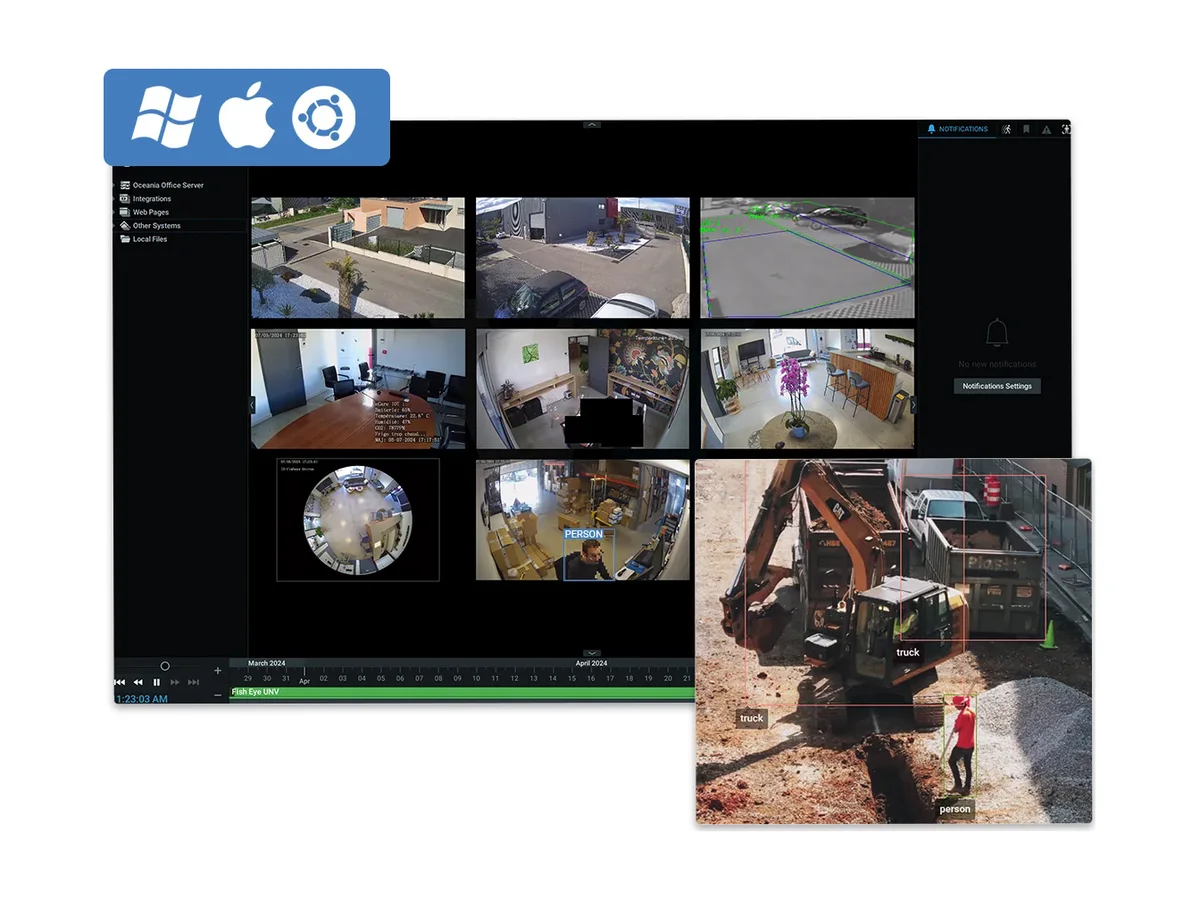
Image from the manufacturer, Network Optix.
From practice
Where a trial usually goes wrong
Recording everything continuously
The default setting fills a disk in days, and then it looks as if you need far more storage than you do. Recording on motion often turns those days into weeks, with the same cameras.
Testing on a laptop and drawing conclusions
A laptop with four cameras says nothing about fifty cameras on a server. “It is slow” nearly always comes from a setup that was never meant for the job.
Activating the trial too early
Thirty days sounds like a lot. In practice two weeks pass before anyone has time, and half the trial is gone.
Only looking at live view
Live view looks much the same on every system. The difference is in searching back: click where something happened and have your clip within a minute. That is what you should test.
Outside the Netherlands
Can you help us if we are not in the Netherlands?
Yes, remotely and in English. We install and configure servers over a remote session, add cameras, set up users and rights, and help when something stops working, also on systems bought elsewhere. Remote help is charged at €95 per hour excl. VAT, and we agree the work with you before we start.
Licences are delivered by email anywhere in the world. Outside the EU no Dutch VAT is charged. We only sell to businesses. See remote support for what we do and how a session works.
Frequently asked
What people ask us about downloading and trying Nx Witness
Is Nx Witness free?
Downloading and installing is free. Recording is not: you need a licence per camera. The software comes with 4 trial licences of 30 days each, so you can judge whether it suits you before you buy.
Do I need a dealer to download Nx Witness?
No. You get the files straight from Network Optix. You need a reseller once you want to buy licences or want help setting the system up. We do that worldwide by email and remote session, also when the licences were bought somewhere else.
Which operating systems does Nx Witness run on?
The server runs on Windows, Ubuntu Linux and 64-bit ARM. The desktop client runs on Windows, Ubuntu and macOS, both Apple Silicon and Intel. A normal workstation is fine for a trial; for a real system it depends on the number of cameras, the resolution and how many days you keep the footage.
Can I expand my trial setup later?
Yes. You buy licences and the setup stays as it is. If it grows further, you add a server that becomes part of the same system. You pay per camera, not per server.
We downloaded it but cannot get it working. Can you help?
Yes. Usually it is cameras that are not found, storage that is not recognised or the network in between. We look at it with you over a remote session in English, at €95 per hour excl. VAT.
Ready to record for real?
Order the licences online and receive the codes by email, or tell us what you want to set up and we help you remotely.
A quick word
Questions about your situation? Call John.
Watches over the part you only notice years later: continuity, and agreements that hold. Describe your situation and you will hear straight away what we would do, with no obligation.
John van den Bosch · Co-founder